
WP-CopyProtect WordPress Plugin

WordPress users have long had plugins to extend their blogging platform in countless ways. And on Plagiarism Today we’ve talked about many plugins that work to protect your content including the Digital Fingerprint plugin and Copyfeed.
However, where most plugins have worked to protect your feed, a plugin by Chetan Gole entitled WP-CopyProtect wants to help you protect your content from those that would misuse it by visiting your site directly.
But while the plugin is very simple and easy to use, by the author’s own admission, it doesn’t do a great deal to stop content misuse and, in my opinion, is most likely a step backwards for most bloggers.
How it Works
WP-CopyProtect has two basic functions. The first is disabling right click on your site and the second is preventing text selection. To do this, it uses well-established (and widely hated) JavaScripts that the plugin will place into your site’s footer at the click of the mouse.
When you first install WP-CopyProtect, and visit the settings page, you’re given a screen with the option to enable or disable both right click text selection on your site. You can also select a specific warning that users will see when they try to right click on your site.
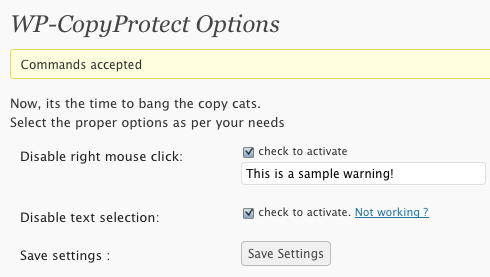
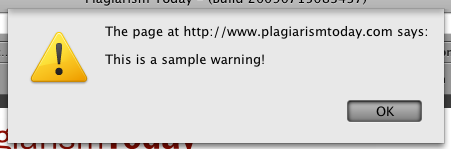
Once activated, the scripts do seem to work well enough as they are based upon well-established techniques. Though they can be defeated any number of ways, they do function as advertised.
However, if you enable the anti-text selection feature, the plugin adds a footer to your entire site that promotes the plugin. It seems to disappear if you turn off that particular feature, but there is no warning in the plugin itself that it does this and there doesn’t seem to be an easy way to either edit this footer, disable it or even style it.
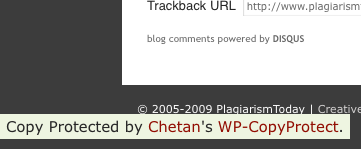
Needless to say, I found this very annoying and frustrating. Especially since it provides links back to the original site that appear to be search-engine friendly, meaning that it could be viewed by Google as a form of spamming and hurt the blog’s PageRank.
This is extremely dangerous and, in my view, poor form to do so without warning or a means to remove it.
My Take
Using DRM on your site is a bad idea, period. These scripts will do little, if anything, to protect your content and will do a great deal to frustrate those who use your site legitimately.
Many, myself included, do a lot of navigation using the right click menu and there are many legitimate reasons to want to select text on a site. For every infringer that is hindered or thwarted, dozens of legitimate users will be hurt far worse.
The footer issue is also very troublesome to me. Though I am fine with plugin authors getting credit for their work, I may consider adding a page that lists the active plugins used on this site, adding a footer link without permission or any means of removal is poor form, especially considering how harmful it could be to users.
Despite all of this, I have to give Gole high marks for his honesty about his plugins limitations. He has the following statement both on the plugin’s page in the admin panel and a similar one on his own site.
This is just a basic copy protect plug-in, if someone want to copy your content he/she can go to source of the blog and can easily copy the stuff from there. Most copy cats use your blogs RSS feeds to steal the content. Always select “Summary” at “For each article in a feed, show” in Wordpress admin panel “Reading Settings” so that even if someone try to copy your content from feeds he/she can not copy the whole post.
Gole also admits that he doesn’t use the plugin on his own site because he uses a CC license, which permits copying.
But even though Gole is honest about what his plugin’s limitations are, that doesn’t encourage me to recommend it, just further remind me why most people should stay away from it.
Bottom Line
I can’t think of many reasons why someone would want to use this particular plugin. There is almost no reason to use these scripts on your site and, if you do need them, it’s pretty trivial to search for them and paste them into your own HTML. It certainly isn’t much more difficult than using this plugin and there’s no footer to worry about.
All in all, though I want to encourage plugin developers to create tools that can help content creators track and prevent misuse, I think this was a misguided effort. Still, I have to go easy on the author because it is, according to him, his first plugin and it shows both an interest in this particular area as well as some potential.
On that note, there is a lot of promise for WordPress plugins in this area and that’s something I’m going to talk about tomorrow.
Want to Reuse or Republish this Content?
If you want to feature this article in your site, classroom or elsewhere, just let us know! We usually grant permission within 24 hours.