
An Inside Look at iCopyright Discovery
 Earlier this month, I reported on iCopyright’s new content tracking tool Discovery. At that point, I only had the information provided in the press release for the service.
However, last week, Mike O’Donnell, the President and CEO of iCopyright, was kind enough to give me a guided tour of the backend. Though I wasn’t able to access anything hands on or experiment with the technology with my own content, that will have to wait until the service is available for iCopyright for Creators users, I was able to see what the service does, how it works and what it can do.
So here is a brief look at what the iCopyright Discovery system can do and how it will likely look when it is available for Creators users shortly. Please bear in mind that this is not a review, just a tour of the key features of the service.
The Basic Premise
The big idea of Discovery is this: Discovery parses your content as you put it up on the Web, accessing either a created XML file or your RSS feed, and then searches for copies of it on the Web.
The service then searches for matches of your content, highlighting ones that it determines to be the most important, and gives you options for remedying the situation. Among the actions it can perform are removal requests, which fundamentally DMCA notices, license requests, which goes through iCopyright’s existing licensing system, and forwarding to legal counsel.
This idea is fundamentally very similar to Attributor and Blogwerx, both of which are still in private testing. However, the execution of the system is going to be what is important. On that front, iCopyright has devised an interesting workflow system that seems to string the process together very well.
Setting Up Discovery
When a user first signs in to Discovery, the first page they’re likely going to head to is, oddly enough, the “Settings” page. The reason for this is that, without visiting the settings page, you have little control over the matches you see and you can’t use several of the remedy options.

From this page, you can set your enforcement agency, useful if you are part of a group that handles your copyright enforcement, and the email address to your legal counsel. This will let you enable addition redress steps down the road. However, the most important settings are the search sensitivity and risk assessment as they determine the matches you see down the road.
The search sensitivity feature allows users to tell Discovery how many matches they want. They can set it so that only the worst matches appear in the system or so that they see almost everything. This is done by tweaking the minimum match ratio, meaning how much of the original work must appear in the copy, the minimum risk factor, discussed below, the minimum site activity and the minimum number of copied words that must appear in the match, useful for sites with short posts.
The Risk Assessment tool is easily one of the most interesting features in iCopyright Discovery. It lets users set the criteria for determining how much of a risk a match site is. You do that by setting sliders for Unique Visitors, which looks at the estimated traffic of the site, the number of inbound links, whether the site displays ads or how much of the content it copies.
These sliders are intended to be abstract in nature and are used to indicate which attributes are more important than others. For example, if you set all to 10, they would be weighed equally. However, if you put one at 5 and the others at 10, the first one would be weighed much less.
These attributes, when combined with the site’s actual use of the content, are used to determine the risk level of the site itself. This, in turn, plays a major role in determining the priority the site is given when analyzing suspect pages.
Sorting Matches
Once you are done telling Discovery what matches you want to see, the system then does a refresh, which takes about an hour according to O’Donnell, and you can then view your matches or “suspects”.
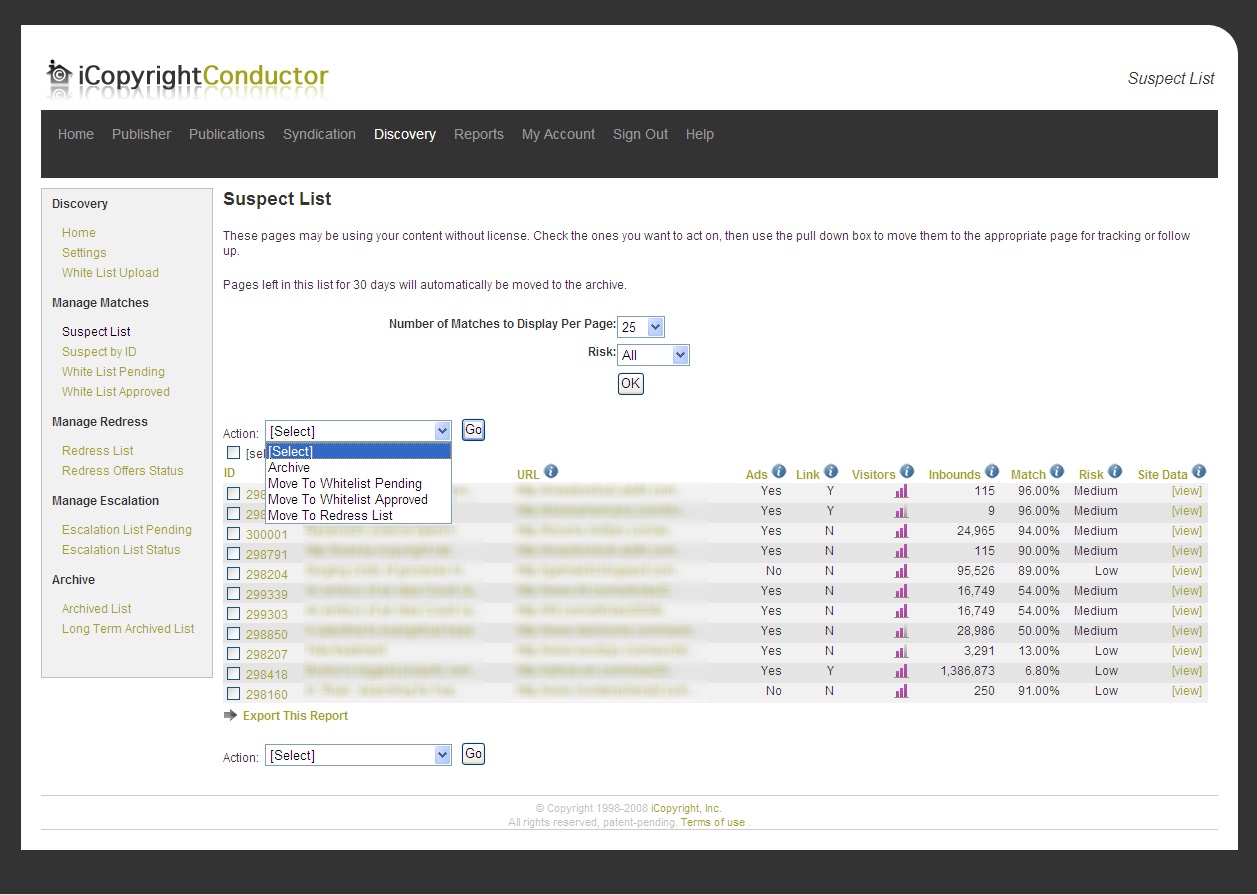
The match sort is organized by a combination of variables, focusing heavily on suspect pages with the highest risk. For each suspect, the system displays the URL of the work, whether it displays ads, whether it links back to your site, roughly how many visitors it gets, the number of inbound links to the site, the match percentage and the risk.
From this page, you can go through the matches and either archive the match, which functions similar to Gmail’s archive function and takes no action, move it to the Whitelist, either pending or approved, or send it to the redress list.
If a site is moved to the whitelist, that means that the use is licensed and future matches from the site will be ignored. You have the option of telling the system to either ignore matches on the URL, the subdomain or the entire domain.
If you move it to the redress list, you can then take further action on the match, including licensing the work or filing a removal demand.
Taking Action
The redress list, as you see below, looks very similar to the suspect list and contains much of the same information. However, the options for what one can do with a suspect are different on this page.

From this page, you can then either offer the site a license, which will send out an email encouraging the site admin to go through the existing iCopyright system, file a link request or send a removal notice.
Removal notices, fundamentally, are DMCA notices though they are written so that, at this stage, they can be sent to Webmasters directly. Link requests are more like informal license offers, but ones where the only stipulation is a link back.
All of the letter types are fully customizable and Discover offers a templating system that lets you build your own letter that automatically inserts the necessary information.
Once you file a redress, you can then track the status of it in the Redress Offers Status page. From there, it will let you know if the redress has been completed and, if it hasn’t, makes it available to be escalated.
If a suspect match is moved to the escalation list, then the user has a whole new series of options for how to deal with the site.
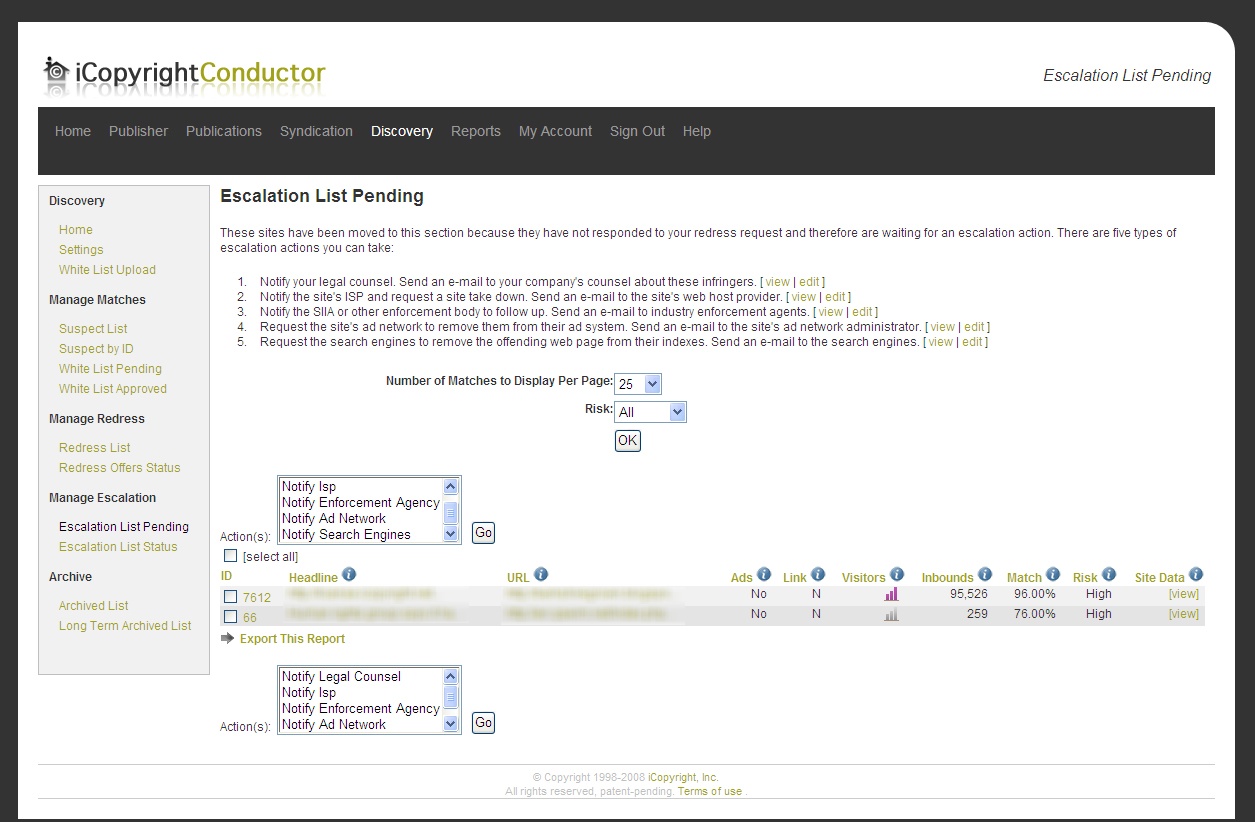
The options include the ability to, forward the situation to your legal counsel (if set up), notify the ISP, which sends a more traditional DMCA notice, notify the enforcement agency (if set up), send a notice to the ad network or demand removal from the search engines.
All in all, the initial Redress List can be looked at as the cease and desist/licensing phase where the Escalation List deals more with the DMCA/lawyer phase.
However, no matter what redress steps you take, Discovery offers a powerful means to track and monitor the progress of the steps that you took.
Tracking and Monitoring
Once you’ve taken a redress action against a suspect site, you can then track and monitor everything that has to do with that particular match.
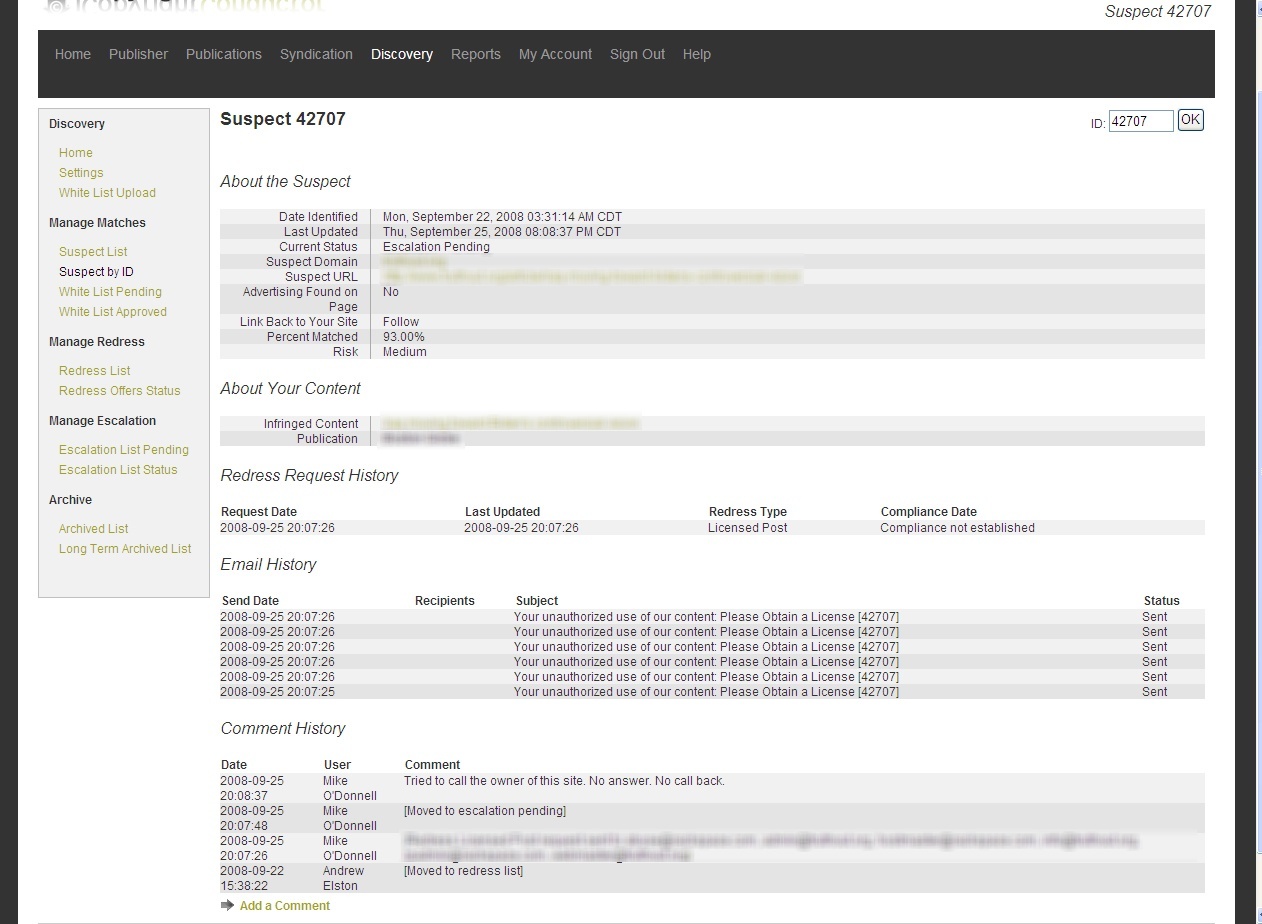
It provides much more than just a brief history of what has taken place, giving a detailed history of every email sent, comments left in the system, both automatic ones and ones left by the user, as well as other information about the site.
The idea is to maintain a record of every action, including emails, phone calls and other steps, for the purpose of aiding in any potential legal case.
Once the matter is resolved, escalated outside of the system or the match is whitelisted, the case can be archived and thus removed from the suspect pool, allowing you to move on to other matches.
Some personal thoughts
It is very hard for me to offer any real review of the service. Without actually being hands on with the service and using it against my own content, there is not much that I can do.
Right now there are many unknowns for me, including the following:
- Match Detection: O’Donnell has said they are partnering with a major search provider to perform the detection but it remains to be seen how effective it is. Match detection is not easy, even with a big search partner, as Copyscape showed. The system will not be of much use if its match detection is not the best in its class.
- Resolution Assistance: The hardest part about stopping a plagiarist is not composing the letter, but finding who to send it to. It is easily the biggest time sink in most of my cases and is the number one reason people approach me for help. It remains to be seen how effectively Discovery helps with this process.
- Speed/Usability: Obviously, without actually using the system, I can’t tell how fast it moves and how much time it will save you. If the system is sluggish or error-prone, it could greatly hurt its usefulness.
This is not to say that these things are wrong with the current system, just that I don’t know right now and won’t until I can do a full review, likely later this year.
However, judging from what I can see, the system is very impressive. It looks very good, has a solid workflow built into it, though I somewhat disagree with having the ISP step be only available in the escalation section, and seems to be built with the user in mind.
What I like best about Discovery is how the user customizes the system to fit their needs, with their own definitions of what matches to worry about, their own letters and their own general strategy. Any such system should focus on automating what can be automated, but leaving the big decisions to the copyright holder.
What does worry me some is that the system is clearly geared toward larger clients. Discovery is designed to allow for multiple users to access an account and to work with attorneys as well as other rights enforcers. While those are great features for those that need them, it remains to be seen how the system will strip down for smaller copyright holders.
The other downside is that, according to O’Donnell, the version of Discovery for Creators will come with some kind of fee. Though pricing structure has not been discussed, he seemed confident that it would not be available for free.
Still, as these screenshots show, there is a lot to like in the Discovery system and the solution it promises.
It has a great deal of potential and Webmasters who are worried about tracking how their content is used should definitely take a serious look at what iCopyright has to offer.
Conclusions
There’s a lot of reason for me to be excited about the upcoming Discovery system. However, I have to restrain that excitement until I can use the system first hand and see both how effective it is and how smooth the process is.
No matter what though, I am happy to see that people are thinking about these issues and coming up with solutions. This has been a booming industry over the past few years and a lot of very smart companies are already involved and I am happy to be working in this field.
No matter what Discovery itself brings, it can only signal great things for copyright holders and Webmasters. Hopefully, this will help content creators not just enforce their rights, but understand how their work is being reused and encourage the kind of sharing that helps all involved.
Knowledge and tools can only help improve things, so long as those who use them do so wisely.
Want to Reuse or Republish this Content?
If you want to feature this article in your site, classroom or elsewhere, just let us know! We usually grant permission within 24 hours.